Tutorial: how to make a lines plan in Rhino from .pdf

Surfer Naval Architect

Naval Architect
Joined
Feb 14, 2018
Posts
46
Reaction score
1
Location
Amsterdam, The Netherlands
Hello everyone,

I would like to develop my skills in Rhino, therefore I would like to import a lines in pdf in Rhino. Then from the pdf I want to develop the lines and then the surfaces. Do you have a good tutorial (also a video is fine)? Unfortunately I still didn't find an easy and clear one on internet.

Thanks!
 
Surfer what sort of PDF, there is vector and raster pdf’s. Vector will import directly, raster is an image file which you will have to either trace manually or use a raster to vector converter (Autotracer.org is one which is free). Line drawings from raster images would be approximate as it comes down to which pixel is selected.
 
Best workflow is extracting of the reference, for both raster and vector you can use inkscape and divide if grouped, and save or copy to clipboard and paste in rhino if possible, or save as a vector image or raster PNG image, sometimes I also use Gimp to import pages with high DPI and export your image as PNG.
 
First step is to create a set of 3D curves in Rhino from the 2D curves in the PDF. The steps below assume a table of offsets is not available.

Many PDF's can be imported directly into Rhino using the Import command. After importing the PDF use Scale to scale the image to the desired size.

Trace of the curves in the image. It is helpful to put the waterlines in one layer, the buttocks in another layer, etc.

Orient the 2D curves on the appropriate planes using Rotate and Move.

Use SetPt or Move to place the waterlines to the approriate z values, the buttocks to the appropriate x values, stations at eh appropriate x values, etc.

Create 3D versions of the sheer curves, etc using Crv2View.

You should now have a 3D version of the lines.

Next steps to create a surface depend on the shape and which curves are included in the lines plan.
 
creating the surfaces is the hardest part, especially being able to control the surfaces to actually match your design and at the same time ensure a high degree of fairness. There are quite a few rhino specialists here and expecting also to see / discuss their approach and work flow for creating surfaces after one has successfully input sections, waterline, sheer line etc.
 
creating the surfaces is the hardest part, especially being able to control the surfaces to actually match your design and at the same time ensure a high degree of fairness.
True for creating surfaces in any software, not just Rhino. Usually there is a tradeoff between matching design intent, fair surfaces, and the amount of knowledge needed and effort required. To achieve the first two generally requires knowldge and effort. There are shortcuts which reduce the knowledge needed or amount of effort required, but using those shortcuts usually results in deviation from the design intent and/or surfaces which are not sufficiently fair.

Yes, getting the surfaces to fit exactly in the lines of our body lines plan, in Rhino, is not easy (if not impossible, within acceptable time limits)
Incorrect. It is possible to create surfaces in Rhino which "exactly" fit the a lines plan within any specified tolerance, though some of the methods shown in popular You Tube videos may not be suitable. (This assumes the body lines plan does not have errors such as curves not actually intersecting where they cross.)
 
Last edited:
The most difficulty is the Nurbs behaviors, where the density of control points modulate the tension of resulting surface, an many control points mean major problem on surfaces smoothness and continuity, the simple way that I use not in Rhino but is the same I think if possible is with the helping of intersection plane, that let me know how is the boundary of real surface resulting, I dont think that is possible with Rhino easily as I can with my super cheap workflow, I have the possibility to check in real time, the position of every sections where I place the intersecting plane, that change dynamically when I do any changes on the surface with control points, that is maybe possible with an add-on that generate the lines-plan from hull. But as already said is possible with time an constructions, but is not a super easy workflow.
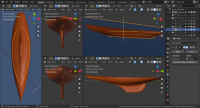
My workflow is with subdivision surfaces with Blender isn't a mathematical precision like Rhino but but I'm happy with final result, I can make a very close to linesplan surface with conversion inside DELFSHip or FreeSHp
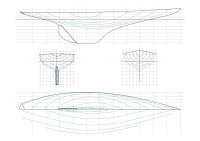
You can see my latest hull R-Boat Pirate with this recent workflow here, but the rudder need a revision.
R-Boat-Pirate_04.png R-Boat-Pirate_Linesplan.png
 
My workflow is with subdivision surfaces with Blender isn't a mathematical precision like Rhino but but I'm happy with final result, I can make a very close to linesplan surface with conversion inside DELFSHip or FreeSHp
Sounds like you have made some choices in the tradeoffs between matching design intent, fair surfaces, and the amount of knowledge needed and effort required.

Your Pirate results look good.

Do you directly compare the accuracy of your results to the lines plan?
 
Sounds like you have made some choices in the tradeoffs between matching design intent, fair surfaces, and the amount of knowledge needed and effort required.

Your Pirate results look good.

Do you directly compare the accuracy of your results to the lines plan?
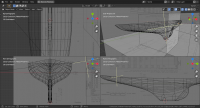
Yes Is an hard works, because these surface follow the same rules for what happen with Nurbs, but I check the model on the way, is more simple after I figure out use the a dynamical intersections with a plane and my reproductions was made over the original linesplan when they are available. but is a learning path and I have many workaround
Below the hull with linesplan in background but I know is compromise, when I have to remake an hull, maybe is more simple making a new one, where I'm free to make an independent hull from constraint of linesplan.
R-Boat-Pirate.png
 
Incorrect. It is possible to create surfaces in Rhino which "exactly" fit the a lines plan within any specified tolerance
Any software, no matter how bad it is, with time and a lot of patience, allows us to achieve that. But the thing to keep in mind is that you cannot afford to make a model any longer than you do the project of the boat. On the other hand, the surfaces that are so beautiful and smooth that many programs have are tricky because these programs are designed to remove any lumps that may be present and give the surface a "prettier" appearance than reality.
Although you do not believe it, I have experience working with Rhino although I have never been interested in being an expert because that software does not serve me for my projects. They are much more reliable, to make the naval architecture calculations, the models made, for example, with AutoCAD than with Rhino. You may have the opposite opinion, of course, but I tell you about my experience with various naval architecture software.
 
On the other hand, the surfaces that are so beautiful and smooth that many programs have are tricky because these programs are designed to remove any lumps that may be present and give the surface a "prettier" appearance than reality.
What "programs are designed to remove any lumps that may be present and give the surface a "prettier" appearance than reality"?

Although you do not believe it, I have experience working with Rhino although I have never been interested in being an expert because that software does not serve me for my projects.
I believe that you have experience working with Rhino. I request that you stop claiming that I do not believe it. As you say "I have never been interested in being an expert" so I believe that you do not have any expert knowledge of what can be done by someone with more knowledge about using Rhino than you have.

They are much more reliable, to make the naval architecture calculations, the models made, for example, with AutoCAD than with Rhino.
Do you create surfaces in AutoCAD?
What input do you use for calculations in AutoCAD - surfaces, lines/curves, offset?
 
What "programs are designed to remove any lumps that may be present and give the surface a "prettier" appearance than reality"?
Renders in Rhino
I request that you stop claiming that I do not believe it
You are right but you will understand, I hope, that this is a ready-made phrase, a standard expression, that is not really affirming anything about your behavior. I am sorry that you have interpreted it as that I know what you think at every moment. It was only a way to express myself. Don't be mad at me that life is short and we enjoy it.
Do you create surfaces in AutoCAD?
What input do you use for calculations in AutoCAD - surfaces, lines/curves, offset?
Of course I create surfaces with AutoCAD, why not? I will not think you doubt it so that you do not get mad at me.
Yes, all those ways of entering data that you mention and some more, ttf files, pdf files, any image file ...
 
In response to:
What "programs are designed to remove any lumps that may be present and give the surface a "prettier" appearance than reality"?
TANSL replied:
Renders in Rhino
Rhino can be used to create renders which are "prettier" than reality. But that does not mean Rhino automatically removes bumps, etc. It does not. Smoothing is a choice made by the user, not something which is automatically built into Rhino. Claims that Rhino automatically smooths surfaces and creates less accurate results is incorrect.
 
Of course I create surfaces with AutoCAD, why not? I will not think you doubt it so that you do not get mad at me.
Yes, all those ways of entering data that you mention and some more, ttf files, pdf files, any image file ...
My question was genuine. I tried AutoCAD briefly about 10 years ago and my recollection is AutoCAD's capabilities for creating arbitrary surfaces was less than Rhino's capabilities at the time. Software changes over time so I do not know how AutoCAD and Rhino currently compare.

Do you use the surfaces you create in AutoCAD as input for calculations? If so are the calculations done directly using the surfaces or are the lines or points extracted first?

Yes, all those ways of entering data that you mention and some more, ttf files, pdf files, any image file ...
How do you calculations starting with an image of a lines plan? Do you create first create surfaces based on the lines plan or do you work directly from the curves in the lines plan?
 
Forum posts represent the experience, opinion, and view of individual users. Boat Design Net does not necessarily endorse nor share the view of each individual post.
When making any potentially dangerous or financial decision, always employ and consult appropriate professionals. Your circumstances or experience may be different.

  • Back
    Top